
Mulch & Soil Bag Calculator
Estimate mulch, compost, soil, and bag counts across multiple zones with live calculations, pricing guidance, and a print-friendly summary.
Project Setup
Switch unit systems at any time. Results stay synced instantly.
All cost estimates update immediately in your selected currency format.
Suggested automatically from your project type, but fully editable.
Starts with a smart suggestion and updates live as you type.
Pricing & Advanced Controls
Reverse Coverage Helper
Project Zones
Each section can use a different shape. Choose rectangle, circle, triangle, or custom area for every zone.
Live Results
Bag Estimates
| Bag size | Bags | Estimated cost |
|---|
Explain My Result
Add your first section to start calculating.
If your browser does not support sharing or clipboard access, you can still copy from the summary box manually.
Table of Contents
Introduction To The Mulch & Soil Bag Calculator
Take the guesswork out of your landscaping projects with our powerful Mulch & Soil Bag Calculator. Whether you’re working on a garden bed, lawn topdressing, or a full backyard makeover, this tool helps you calculate exactly how much material you need in seconds.
Simply enter your area dimensions, choose your material, and select your preferred depth. The calculator instantly shows you the total volume required, the number of bags needed, and the equivalent in cubic yards. It also compares bag vs bulk costs, helping you save money and avoid overbuying.
Unlike basic calculators, this tool supports multiple shapes and areas, allowing you to combine different sections like flower beds, tree rings, and borders into one accurate estimate. You can also switch between units (feet, meters, inches, yards), making it perfect for users worldwide.
Key features include:
- Accurate mulch, soil, compost, gravel, and sand calculations
- Multiple area shapes (rectangle, circle, triangle, trapezoid)
- Bag size selector and custom input options
- Bulk vs bag cost comparison
- Built-in waste/buffer calculations
- Coverage estimator (how much area your bags will cover)
- Mobile-friendly design for use on-site or in-store
Whether you’re a homeowner, gardener, or landscaping professional, this calculator ensures you buy the right amount of material every time, no more wasted money or extra trips to the store.
Start calculating now and plan your project with confidence.
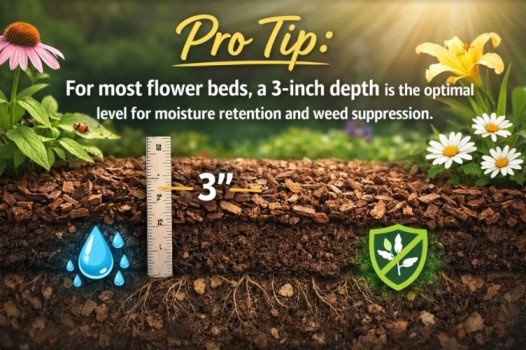
Pro Tip: For most flower beds, a 3-inch depth is the optimal level for moisture retention and weed suppression.
Mulch & Soil Quick Reference Table
Use this reference table to quickly estimate how many bags of mulch or soil you need based on area and depth.
| Area (sq ft) | Depth (inches) | Cubic Feet Needed | 2 cu ft Bags Needed | Cubic Yards |
|---|---|---|---|---|
| 50 | 2″ | 8.3 | 5 bags | 0.31 yd³ |
| 50 | 3″ | 12.5 | 7 bags | 0.46 yd³ |
| 100 | 2″ | 16.7 | 9 bags | 0.62 yd³ |
| 100 | 3″ | 25 | 13 bags | 0.93 yd³ |
| 200 | 2″ | 33.3 | 17 bags | 1.23 yd³ |
| 200 | 3″ | 50 | 25 bags | 1.85 yd³ |
| 500 | 2″ | 83.3 | 42 bags | 3.09 yd³ |
| 500 | 3″ | 125 | 63 bags | 4.63 yd³ |
How To Use The Mulch & Soil Bag Calculator
Our Mulch & Soil Bag Calculator helps you quickly estimate how much mulch, soil, compost, topsoil, or raised bed mix you need for your gardening or landscaping project. Whether you are covering a flower bed, filling a raised bed, or topping up soil, this calculator makes it easy to estimate bag counts, cubic feet, cubic yards, and project cost.
Step 1: Choose Your Material
Start by selecting the type of material you want to calculate. You can choose mulch, soil, compost, topsoil, or raised bed mix. This helps the calculator provide more useful recommendations based on your project.
Step 2: Select Your Project Type
Choose the type of project you are working on, such as a flower bed, raised bed, vegetable garden, tree ring, playground, walkway edge, lawn topdressing, or pots and containers. The calculator can suggest a recommended depth based on the project type you choose.
Step 3: Pick the Shape of Your Area
Select the shape that best matches your landscape or garden area. You can choose from rectangle, circle, triangle, trapezoid, or custom area. Once you pick a shape, the calculator updates the measurement fields to match that shape.
Step 4: Enter Your Measurements
Enter the dimensions of your project area. Depending on the selected shape, you may need to enter length and width, diameter, base and height, or total custom square footage. If you have more than one area to cover, you can add multiple sections for a more accurate estimate.
Step 5: Choose Your Units
Select the units you want to use for your measurements. You can enter area dimensions in feet or meters, and choose depth in inches or centimeters. This makes the calculator flexible for different types of users and projects.
Step 6: Enter the Depth
Enter the depth of mulch or soil you want to apply. For example, many mulch projects use a depth of 2 to 3 inches, while raised beds and soil fill projects may require much deeper coverage. If you are unsure, the calculator can help by suggesting a depth based on your selected project type.
Step 7: Add Waste Allowance
To improve accuracy, include a waste allowance percentage. This is helpful because some material may be lost due to uneven ground, settling, spillage, or rounding up to full bags. You can also choose whether the project is a first install or a refresh/top-up.
Step 8: Compare Bag Sizes
The calculator compares common bag sizes so you can see how many bags you need. This may include 1 cubic foot, 1.5 cubic foot, 2 cubic foot, and custom bag sizes. This makes it easier to choose the best option for your budget and project size.
Step 9: Enter Pricing for Cost Estimates
If you want a cost estimate, enter the price per bag, bulk price per cubic yard, delivery fee, and tax percentage. The calculator will compare bagged material and bulk delivery so you can see which option may be more affordable.
Step 10: View Your Results
Your results will appear in the results section below the calculator. You will see total area, total volume in cubic feet, total volume in cubic yards, number of bags needed, cost estimate, bulk versus bag recommendation, and a simple explanation of how the result was calculated.
Step 11: Use the Reverse Calculator
If you already have bags at home, use the reverse calculator to estimate how much area they can cover. Simply enter the number of bags you already have and the bag size, and the calculator will estimate coverage at different depths.
Step 12: Share or Print Your Result
When your estimate is ready, you can copy, share, or print the result. This is useful if you want to save the calculation, send it to someone else, or use it as a shopping guide when buying mulch or soil.
Why Use Our Mulch & Soil Bag Calculator?
Our calculator is designed for homeowners, gardeners, landscapers, and DIY users who want a fast and accurate estimate before buying materials. Instead of guessing how many bags of mulch or soil you need, you can get a clearer estimate in seconds.
- Estimate mulch coverage quickly
- Calculate soil bags for garden projects
- Plan topsoil and compost needs more accurately
- Compare bagged material versus bulk delivery
- Reduce overspending and avoid underbuying
Tips for More Accurate Results
For the best estimate, measure carefully, include every section of your project, choose the correct depth, and add a waste allowance. It is usually better to buy a little extra material than to run short halfway through the job.
This is useful when shopping, comparing suppliers, or sending the estimate to a contractor or customer.
Recommended tools for your project
- Garden Rakes (For Spreading Mulch)
- Shovels (For Moving Soil & Mulch)
- Wheelbarrow Alternative (Multi Tools)
- Garden Tool Sets
- Soil Leveling Rakes
Best tips for the most accurate results
Measure carefully
Use a tape measure and check each section twice. Small errors in length, width, or depth can change the final bag count.
Do not overestimate depth
A common mistake is entering too much depth. For mulch, 3 inches is usually enough for most beds.
Use multiple sections instead of one rough guess
If your yard has different zones, calculate them separately. This gives better results than combining everything into one estimate.
Match the real bag size
Always check the product label. A 1 cu ft bag and a 2 cu ft bag can change the total bag count a lot.
Add a small buffer
A 5% to 10% buffer is often the safest choice for most projects.
Compare bag vs bulk before buying
Even if you prefer bags, it is smart to compare both costs first for larger jobs.
Simple example
A user wants to cover a flower bed that is:
- 12 feet long
- 6 feet wide
- 3 inches deep
- using 2 cu ft mulch bags
- with a 10% buffer
They would:
- Choose Area → Bags Needed
- Select Flower Bed
- choose Mulch
- Keep Imperial
- Set depth to 3 inches
- Enter one Rectangle area section with 12 and 6
- Choose a 2 cu ft bag
- Choose 10% buffer
- Enter the price if they want cost estimates
- Review the total bags and bulk comparison
The amount of mulch or soil you need depends on your area size and the depth of application.
A simple way to calculate this is by multiplying the total area by the desired depth.
Basic Formula
Volume (cubic feet) = Area (square feet) × Depth (feet)
Since depth is usually measured in inches, you can convert it to feet by dividing by 12.
Example Calculation
If you have a 100 sq ft area and want a 3-inch mulch layer:
- Convert depth: 3 inches ÷ 12 = 0.25 feet
- Multiply: 100 × 0.25 = 25 cubic feet
- Divide by bag size: 25 ÷ 2 cu ft = about 13 bags
Instead of doing this manually, you can use the calculator above to get instant and accurate results.
Is It Cheaper to Buy Mulch or Soil in Bulk or Bags?
Choosing between bulk material and bagged mulch or soil depends on your project size, budget, and convenience.
Each option has its advantages.
Buying Mulch or Soil in Bags
- Easy to transport and handle
- Ideal for small projects and home gardens
- Less mess and easier storage
- More expensive per cubic foot
Buying in Bulk (Cubic Yards)
- Much cheaper for large landscaping projects
- Fewer trips to the store
- Better for professional use
- Requires delivery by a large vehicle
Which Option Should You Choose?
If your project requires less than 1–2 cubic yards, buying bags is usually more convenient.
For larger projects, bulk mulch or soil is often significantly cheaper.
Use the calculator above to compare both options and find the most cost-effective solution for your needs.
Types of Materials You Can Calculate
This calculator works for different landscaping materials. Each material has a recommended depth and use case.
Mulch
Mulch is commonly used for flower beds and around trees. It helps retain moisture and suppresses weeds.
Recommended depth: 2–4 inches.
Topsoil
Topsoil is used for leveling lawns and improving soil quality. It is often applied in thinner layers.
Recommended depth: 1–3 inches.
Compost
Compost enriches soil with nutrients and is typically spread lightly or mixed into existing soil.
Recommended depth: 0.5–2 inches.
Gravel
Gravel is used for driveways, pathways, and drainage. It requires a solid base and proper depth.
Recommended depth: 2–3 inches.
Sand
Sand is often used for leveling, pavers, or as a base layer.
Recommended depth: 1–2 inches.
FAQ
How many bags of mulch are in a cubic yard?
There are 27 cubic feet in one cubic yard. If you are using 2 cubic foot bags,
you will need about 13.5 bags per cubic yard.
What depth of mulch is best?
Most mulch beds perform best at around 3 inches deep.
2 inches is suitable for topping up, while 4 inches helps with weed control.
How much mulch do I need for 100 square feet?
At 3 inches depth, you will need about 25 cubic feet of mulch,
which equals approximately 12–13 bags of 2 cubic feet each.
Should I buy extra mulch or soil?
Yes, it is recommended to add a 5% to 10% buffer to account for uneven surfaces and settling.
Can I use this calculator for soil, compost, or gravel?
Yes, this calculator works for mulch, topsoil, compost, gravel, and sand.
Just select the material and adjust the depth accordingly.
This mulch and soil calculator is designed to provide fast, accurate estimates for any landscaping project.
Use it to save time, reduce waste, and plan your materials with confidence.
Related calculators
Raised Bed Soil Mixer Calculator
Fertilizer N-P-K Ratio Mixer Calculator
Compost C:N Ratio Optimizer Calculator